Posts filed under AI

Introducing the NEW Tabular Editor CLI - with Peer Grรธnnerup

LIVESTREAM DATE/TIME ๐Ÿ“…

May 29th 9:30 AM (Pacific Time)

DESCRIPTION ๐Ÿ“„

Command line tools have a reputation problem. People hear "CLI" and either tune out or assume they need to be a DevOps engineer to get any value out of it. For most semantic model developers, that's been the story for years.

The new standalone Tabular Editor CLI changes that. You don't need to live in the terminal to automate validation, deployment, and testing across your tabular models. You just need a starting point.

In this livestream Peer will be walking through the new CLI from scratch: what it is, why it matters for Power BI and Fabric work, and how it fits into the rest of your workflow (AI agents included, if that's your flavor). We'll cover:

  • What the Tabular Editor CLI actually does

  • Local setup with zero prior CLI experience

  • Using AI agents to generate and run commands for you

  • Automating model validation, testing, and deployment

  • Wiring it into CI/CD without breaking everything No prior command line experience required.

If you've been CLI-curious but didn't know where to start, this one's for you.

GUEST BIO (Peer Grรธnnerup) ๐Ÿ‘ค

Peer is a Data & AI professional with 15+ years of experience in BI, semantic modeling, and data platform automation. As Head of Engineering at Tabular Editor, he focuses on building tools and features that help teams create better data models faster, with a strong emphasis on automation, developer experience, and CI/CD, including leading the development of the new Tabular Editor CLI.
RELATED CONTENT ๐Ÿ”—

Peer's Blog
Peer's GitHub
TE CLI Release

Posted on May 18, 2026 and filed under Livestreams, Tools & Software, AI.

Vibe Coding a Desktop Tool with AI

Video by: Reid Havens

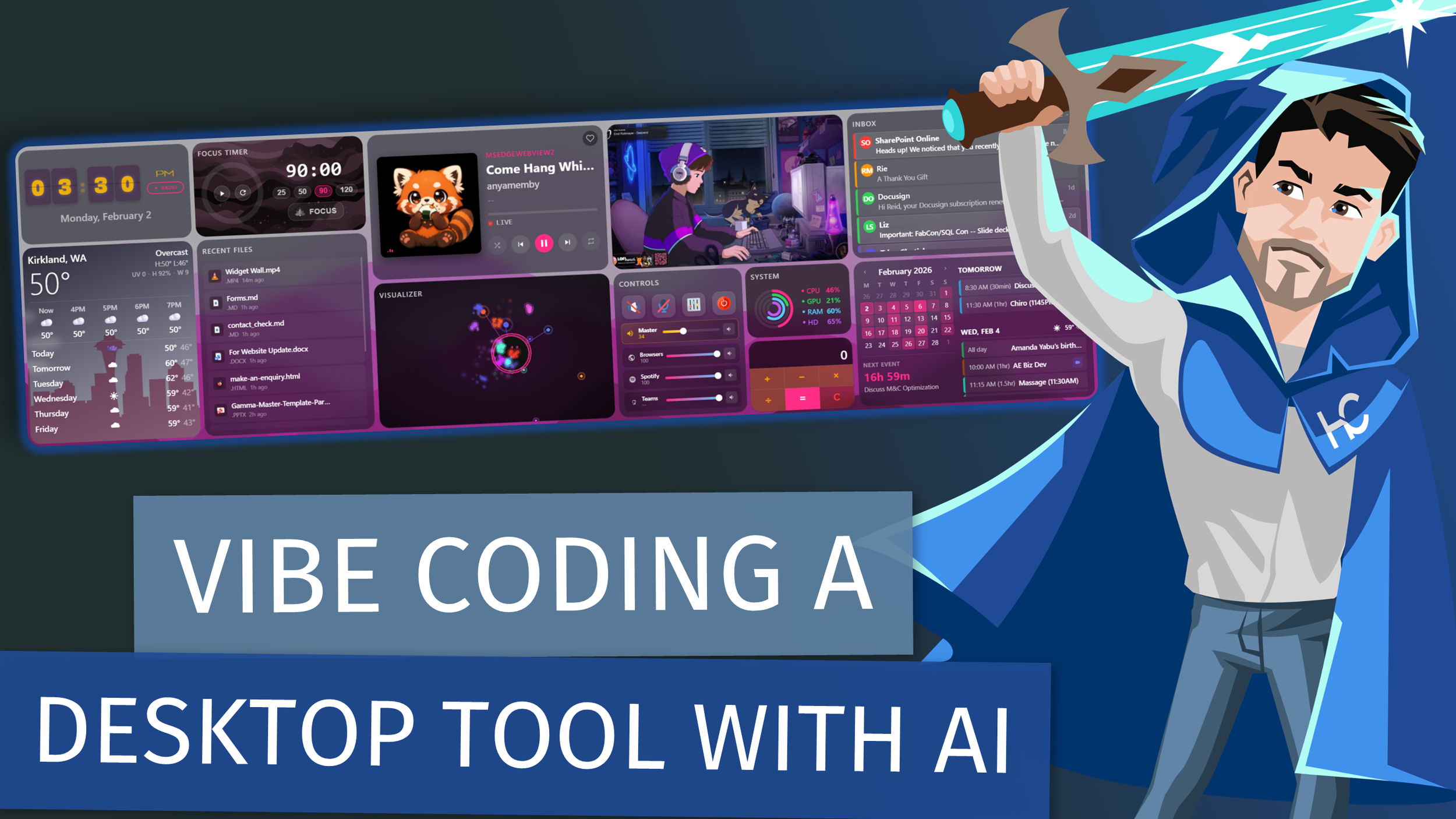
This project was built almost entirely using Claude Code through pure vibe coding. No detailed specs.

No formal architecture. Just me giving the LLM ideas, screenshots, and plain-English requests until a real desktop tool existed. In this video, I walk through the Desktop Widget Wall I built and focus on the art of the possible, not the implementation details. This is a non-technical walkthrough meant to show how far you can go when you treat an LLM like a creative collaborator instead of a code generator.

Youโ€™ll see how:

  • An idea turns into a working desktop tool

  • Screenshots and rough concepts become real UI

  • AI can iterate on structure, layout, and behavior - โ€œVibe codingโ€ can replace traditional dev workflows for small tools

  • You can prototype software without writing much code yourself This isnโ€™t a tutorial and itโ€™s not a โ€œhow to promptโ€ video.

Itโ€™s a real example of what happens when you lean into AI-assisted building and let the tool do the heavy lifting. If youโ€™re curious about rapid prototyping, personal tooling, or what modern LLMs can actually build, this should give you plenty of ideas.

RELATED CONTENT ๐Ÿ”—

Widget Wall Repo

Posted on February 24, 2026 and filed under Topics & Discussion, AI.

AI-Powered Power BI: Building Custom Themes & Visuals with GitHub Copilot - with Zoe Douglas

LIVESTREAM DATE/TIME ๐Ÿ“…

February 20th, 2026 - 9:30 AM (Pacific Time)

DESCRIPTION ๐Ÿ“„

GitHub Copilot can turn Power BI customization from a tedious, manual grind into a fast, interactive workflow. In this session, youโ€™ll see how to generate polished report themes by extracting color palettes from images, create named style presets that show up directly in Power BIโ€™s formatting pane, and build custom visuals from scratch with Copilot as your pair programmer. From JSON theme schemas to visual implementation details, youโ€™ll leave with practical techniques to speed up development, improve consistency, and ship better-looking reports with less trial-and-error.

GUEST BIO (Zoe Douglas)๐Ÿ‘ค

I'm a product manager for Power BI working on core visuals with focus on the default and theming experience with visuals in reports. I'm also good with a semantic model and worked on features such as DAX query view, Copilot to write DAX queries, Copilot to write measure descriptions, Optimize ribbon, and more! Before coming to Power BI product group I was a Power BI consultant using Power BI everyday to bring insights to action!

RELATED CONTENT ๐Ÿ”—

LinkedIn
Zoe's Blog
Zoe's GitHub

Posted on February 11, 2026 and filed under Livestreams, AI, Copilot, Power BI.

A Generated Report: How AI can make Dashboards - with Injae Park

LIVESTREAM DATE/TIME ๐Ÿ“…

January 9th 2026 โ€” 9:30AM (Pacific Time)

DESCRIPTION ๐Ÿ“„

This session explores how AI can be applied to the creation and modification of Power BI visuals, focusing on the different levels at which AI tools can interact with reports and models. The session looks at emerging patterns in how AI is being used across the Power BI development lifecycle, and where each approach is most effective.

We Will Cover

  • Using web-based LLMs for fast iteration, ideation, and visual exploration

  • Using MCP-style setups to interact with and modify the semantic model

  • The trade-offs between speed, control, and reliability across these approaches

  • How to choose the right level of AI involvement for different scenarios

This will be a discussion of a few examples of how the technology is moving at a rapid pace, and how that will affect and enable Power BI Developers

GUEST BIO ๐Ÿ‘ค

Injae Park is a Microsoft Data Platform MVP who combines his technical expertise with a passion for teaching by sharing his insights and practical tips through his YouTube channel @PowerBIPark. Injae's content ranges from beginner tutorials to advanced techniques, and as part of the Power BI Core Visual Representatives - he aims to bridge the MS Developer team with the Power BI community. His education in psychology and economics as well as his experience in consulting gives him a well-rounded perspective on the Power BI Developer experience, making his tutorials both engaging and accessible.

RELATED CONTENT ๐Ÿ”—

Injae's Website
Injae's LinkedIn
Injae's YouTube

Posted on January 5, 2026 and filed under Livestreams, AI, Chat GPT, Reporting.